
| 일 | 월 | 화 | 수 | 목 | 금 | 토 |
|---|---|---|---|---|---|---|
| 1 | 2 | 3 | 4 | 5 | 6 | |
| 7 | 8 | 9 | 10 | 11 | 12 | 13 |
| 14 | 15 | 16 | 17 | 18 | 19 | 20 |
| 21 | 22 | 23 | 24 | 25 | 26 | 27 |
| 28 | 29 | 30 | 31 |
- arrow function
- 국가인적자원개발컨소시엄
- 백엔드
- 유클리드_알고리즘
- 개인정보보호교육
- 한국정보보호산업협회
- 포너블
- 개인정보보호
- 동적타이핑
- 가명정보처리
- package-lock.json
- 곱셈 암호
- 백엔드입문
- 개인정보보호위원회
- 디오판투스 알고리즘
- 모듈러 연산
- 확장 유클리드 알고리즘
- 개인정보안전성
- 호이스팅
- Writeup
- 한국산업인력공단
- function scope
- 덧셈 암호
- 웹 프레임워크
- package.json
- 마감임박
- 한국정보보호산업협회기자단
- 무료교육
- pwnable.tw
- node.js
- Today
- Total
짱짱해커가 되고 싶은 나
10-1. 액티비티와 인텐트 본문
* 안드로이드의 4대 컴포넌트
- Activity
화면을 구성하는 가장 기본적인 컴포넌트
- Service
눈에 보이는 화면(액티비티)와 상관없이 백그라운드에서 동작하는 컴포넌트 (서비스 생성->시작->종료)
ex) 백신 프로그램
- Broadcast Receiver
여러 응용 프로그램이나 장치에 메시지를 전달하기 위해 broadcast message를 사용하는데 브로드캐스트 리시버가 이런 방송 메시지가 발생하면 반응한다. 안드로이드는 문자 메시지 도착, 배터리 방전, 네트워크 환경 변화 등이 발생하면 전체 응용 프로그램에게 브로드캐스트를 보낸다. ex) 배터리 경고 문자
- Content Provider
응용 프로그램 사이에 데이터를 공유하기 위한 컴포넌트.
안드로이드 응용 프로그램은 데이터에 자신만 접근할 수 있기 때문에 외부에 자신의 데이터를 공개하기 위해서는 콘텐트 프로바이더를 만들어야한다. 콘텐트 프로바이더의 정보를 제공하는 방법으로는 URI가 있다.
[activity <-> content provider] <-> [URI] <-> [content provider <-> activity]
* Activity
사용자에게 보여주는 화면을 생성하는 컴포넌트로 여러 개의 액티비티를 사용할 수 있다.
새로운 액티비티 자바 클래스를 만들면 된다. (extends Activity)
<AndroidMainfest.xml>
        <activity android:name=".MainActivity">
            <intent-filter>
                <action android:name="android.intent.action.MAIN" />

                <category android:name="android.intent.category.LAUNCHER" />
            </intent-filter>
        </activity>
        <activity android:name=".SecondActivity" android:label="Second 액티비티"/>
세컨드 액티비티를 등록하기 위해서는 우선 AndroidMainfest.xml에 추가해야한다.
이때 name의 액티비티 이름 앞에 . 를 넣어야한다.
<MainActivity.java>
package com.example.project10;

import androidx.appcompat.app.AppCompatActivity;

import android.content.Intent;
import android.os.Bundle;
import android.view.View;
import android.widget.Button;

public class MainActivity extends AppCompatActivity {

    @Override
    protected void onCreate(Bundle savedInstanceState) {
        super.onCreate(savedInstanceState);
        setContentView(R.layout.activity_main);

        Button btn = (Button)findViewById(R.id.mainBtn);
        btn.setOnClickListener(new View.OnClickListener() {
            @Override
            public void onClick(View v) {
                Intent intent = new Intent(getApplicationContext(), SecondActivity.class);
                startActivity(intent);
            }
        });
    }
}
intent에 포함될 액티비티로 SecondActivity를 넘겨주면 된다. 이 때 꼭 .class를 붙여야한다.
- startActivity(Intent) : 새로운 엑티비티 화면에 출력
* Intent
안드로이드 4대 컴포넌트가 서로 데이터를 주고받기 위한 메시지 객체이다.
- putExtra() : 필요한 만큼 데이터를 인텐트에 넣기
- startActivity() : 인텐트를 다른 액티비티로 넘기기
- getExtra() : 넘어온 데이터에 접근
- 명시적 인텐트(explicit intent)
다른 액티비티의 이름을 명확히 지정할 때 사용하는 방법
일반적으로 사용자가 새로운 액티비티를 직접 생성하고 호출할 때 사용
- 암시적 인텐트(implicit intent)
약속된 액션을 지정하여 안드로이드에서 제공하는 기존 응용 프로그램을 실행하는 것
ex) 전화번호를 인텐트로 넘긴 후 전화 걸기 응용 프로그램 실행
: 안드로이드 제고 앱(전화 걸기, 웹 브라우저, 갤러리, 음악 듣기 등)
<AndroidMainfest.xml>
<uses-permission android:name="android.permission.CALL_PHONE"/>
<uses-permission android:name="android.permission.ACCESS_COARSE_LOCATION"/>
<uses-permission android:name="android.permission.ACCESS_FINE_LOCATION"/>
전화걸기/구글 맵을 사용하기 위해 필요한 권한이다.
<MainActivity.java>
package com.example.project10_2;

import androidx.annotation.Nullable;
import androidx.appcompat.app.AppCompatActivity;

import android.app.SearchManager;
import android.content.Intent;
import android.net.Uri;
import android.os.Bundle;
import android.provider.MediaStore;
import android.view.View;
import android.widget.Button;
import android.widget.EditText;
import android.widget.RadioGroup;
import android.widget.TextView;
import android.widget.Toast;

public class MainActivity extends AppCompatActivity {

    @Override
    protected void onCreate(Bundle savedInstanceState) {
        super.onCreate(savedInstanceState);
        setContentView(R.layout.activity_main);
        setTitle("메인 액티비티");

        Button btn1 = (Button)findViewById(R.id.btn1);
        Button btn2 = (Button)findViewById(R.id.btn2);
        Button btn3 = (Button)findViewById(R.id.btn3);
        Button btn4 = (Button)findViewById(R.id.btn4);
        Button btn5 = (Button)findViewById(R.id.btn5);
        Button btn6 = (Button)findViewById(R.id.btn6);

        btn1.setOnClickListener(new View.OnClickListener() {
            @Override
            public void onClick(View v) {
                Uri uri = Uri.parse("tel:01012345678");
                Intent intent = new Intent(Intent.ACTION_DIAL, uri);
                startActivity(intent);
            }
        });

        btn2.setOnClickListener(new View.OnClickListener() {
            @Override
            public void onClick(View v) {
                Uri uri = Uri.parse("http://www.hanbit.co.kr");
                Intent intent = new Intent(Intent.ACTION_VIEW, uri);
                startActivity(intent);
            }
        });

        btn3.setOnClickListener(new View.OnClickListener() {
            @Override
            public void onClick(View v) {
                Uri uri = Uri.parse("http://maps.google.com/maps?q=" + 37.559133 + "," + 126.927824);
                Intent intent = new Intent(Intent.ACTION_VIEW, uri);
                startActivity(intent);
            }
        });

        btn4.setOnClickListener(new View.OnClickListener() {
            @Override
            public void onClick(View v) {
                Intent intent = new Intent(Intent.ACTION_WEB_SEARCH);
                intent.putExtra(SearchManager.QUERY, "안드로이드");
                startActivity(intent);
            }
        });

        btn5.setOnClickListener(new View.OnClickListener() {
            @Override
            public void onClick(View v) {
                Intent intent = new Intent(Intent.ACTION_SENDTO);
                intent.putExtra("sms_body", "안녕하세요");
                intent.setData(Uri.parse("smsto:" + Uri.encode("010-1234-5678")));
                startActivity(intent);
            }
        });

        btn6.setOnClickListener(new View.OnClickListener() {
            @Override
            public void onClick(View v) {
                Intent intent = new Intent(MediaStore.ACTION_IMAGE_CAPTURE);
                startActivity(intent);
            }
        });
    }
}
ACTION_DIAL : 전화걸기 창을 여는 액션, URI 문자열은 tel:번호 형식으로 사용
ACTION_VIEW : 웹 브라우저를 여는 액션
ACTION_WEB_SEARCH : 구글 검색을 여는 액션
- putExtra(SearchManger.QUERY, 검색어)
ACTION_SENDTO : 메시지 전송 액션
- putExtra("sms_body", 보낼 문자)
- setData("smsto:");
MediaStore.ACITON_IMAGE_CAPTURE : 카메라를 여는 액션
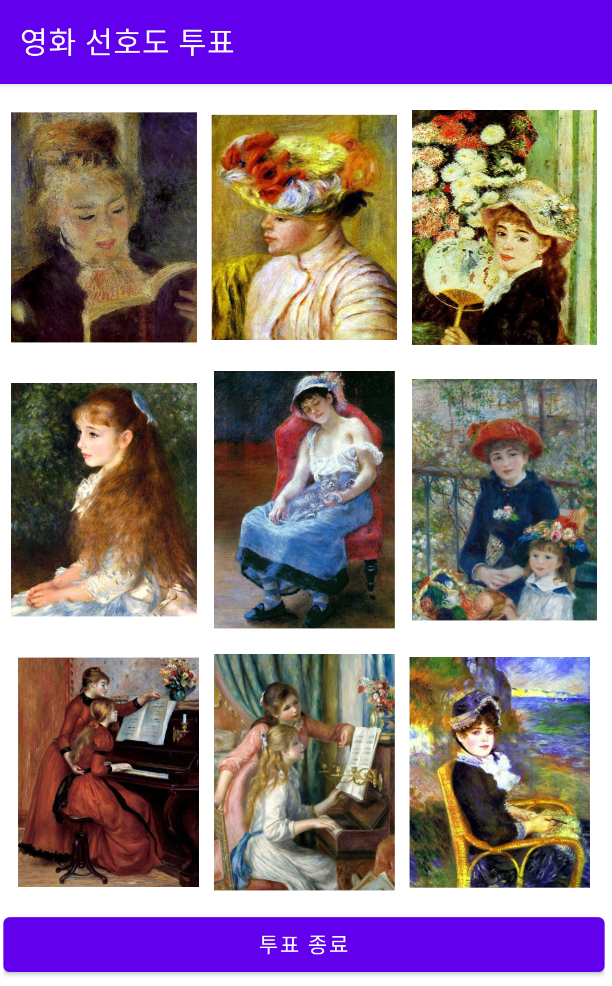
프로젝트1: 명화 선호도 투표 앱
[MainActivity]
- ImageView 9개 : 이미지 클릭 시 횟수++, 토스트(해당 이미지 총 투표수)
- Button 1 : 투표 종료
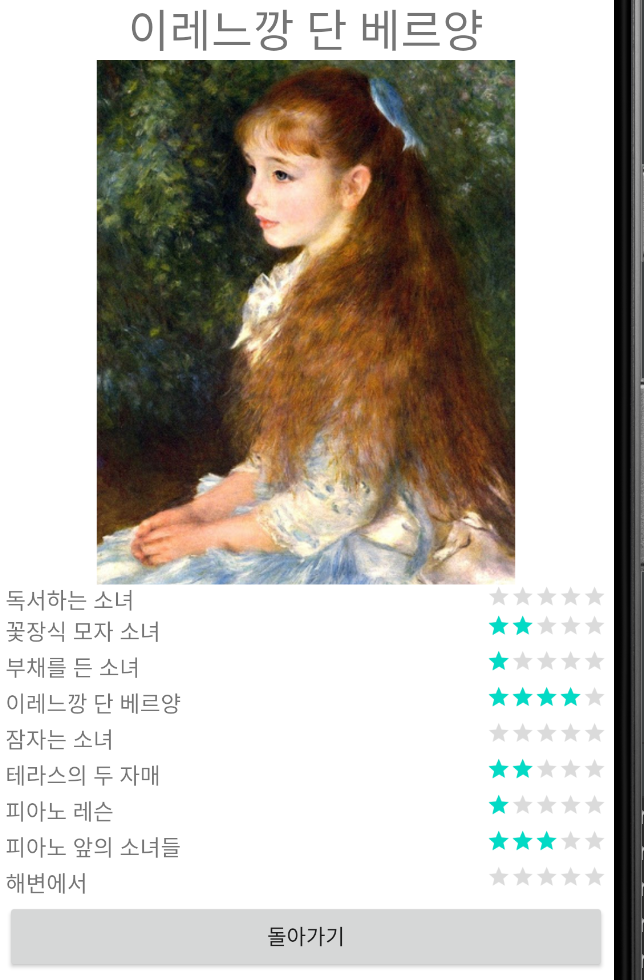
[SecondActivity]
- RatingBar 9개
- Button 1 : 돌아가기
<activity_main.xml>
<?xml version="1.0" encoding="utf-8"?>
<LinearLayout xmlns:android="http://schemas.android.com/apk/res/android"
    xmlns:app="http://schemas.android.com/apk/res-auto"
    xmlns:tools="http://schemas.android.com/tools"
    android:orientation="vertical"
    android:padding="5dp"
    android:layout_width="match_parent"
    android:layout_height="match_parent"
    tools:context=".MainActivity">

    <LinearLayout
        android:layout_width="match_parent"
        android:layout_height="0dp"
        android:layout_weight="3">

        <ImageView
            android:layout_margin="5dp"
            android:layout_width="match_parent"
            android:layout_height="match_parent"
            android:layout_weight="1"
            android:src="@drawable/image1"
            android:id="@+id/image1"/>

        <ImageView
            android:layout_margin="5dp"
            android:layout_width="match_parent"
            android:layout_height="match_parent"
            android:layout_weight="1"
            android:src="@drawable/image2"
            android:id="@+id/image2"/>

        <ImageView
            android:layout_margin="5dp"
            android:layout_width="match_parent"
            android:layout_height="match_parent"
            android:layout_weight="1"
            android:src="@drawable/image3"
            android:id="@+id/image3"/>

    </LinearLayout>
    <LinearLayout
        android:layout_width="match_parent"
        android:layout_height="0dp"
        android:layout_weight="3">

        <ImageView
            android:layout_margin="5dp"
            android:layout_width="match_parent"
            android:layout_height="match_parent"
            android:layout_weight="1"
            android:src="@drawable/image4"
            android:id="@+id/image4"/>

        <ImageView
            android:layout_margin="5dp"
            android:layout_width="match_parent"
            android:layout_height="match_parent"
            android:layout_weight="1"
            android:src="@drawable/image5"
            android:id="@+id/image5"/>

        <ImageView
            android:layout_margin="5dp"
            android:layout_width="match_parent"
            android:layout_height="match_parent"
            android:layout_weight="1"
            android:src="@drawable/image6"
            android:id="@+id/image6"/>

    </LinearLayout>
    <LinearLayout
        android:padding="5dp"
        android:layout_width="match_parent"
        android:layout_height="0dp"
        android:layout_weight="3">

        <ImageView
            android:layout_margin="5dp"
            android:layout_width="match_parent"
            android:layout_height="match_parent"
            android:layout_weight="1"
            android:src="@drawable/image7"
            android:id="@+id/image7"/>

        <ImageView
            android:layout_margin="5dp"
            android:layout_width="match_parent"
            android:layout_height="match_parent"
            android:layout_weight="1"
            android:src="@drawable/image8"
            android:id="@+id/image8"/>

        <ImageView
            android:layout_margin="5dp"
            android:layout_width="match_parent"
            android:layout_height="match_parent"
            android:layout_weight="1"
            android:src="@drawable/image9"
            android:id="@+id/image9"/>

    </LinearLayout>
    <Button
        android:text="투표 종료"
        android:id="@+id/mainBtn"
        android:layout_width="match_parent"
        android:layout_height="wrap_content"/>

</LinearLayout>
<second.xml>
<?xml version="1.0" encoding="utf-8"?>
<TableLayout
    xmlns:android="http://schemas.android.com/apk/res/android"
    android:stretchColumns="0"
    android:layout_gravity="center_vertical"
    android:padding="5dp"
    android:layout_width="match_parent"
    android:layout_height="match_parent">

    <TableRow>
        <TextView
            android:layout_gravity="center_vertical"
            android:layout_width="wrap_content"
            android:layout_height="wrap_content"
            android:text="독서하는 소녀"
            android:textSize="15dp"/>

        <RatingBar
            android:layout_gravity="right"
            android:layout_width="wrap_content"
            android:layout_height="wrap_content"
            android:id="@+id/rating1"
            android:numStars="5"
            style="?android:attr/ratingBarStyleIndicator" />
    </TableRow>

    <TableRow>
        <TextView
            android:layout_gravity="center_vertical"
            android:layout_width="wrap_content"
            android:layout_height="wrap_content"
            android:id="@+id/tv2"
            android:text="꽃장식 모자 소녀"
            android:textSize="15dp"/>

        <RatingBar
            android:layout_width="wrap_content"
            android:layout_height="wrap_content"
            android:id="@+id/rating2"
            android:numStars="5"
            style="?android:attr/ratingBarStyleIndicator" />
    </TableRow>

    <TableRow>
        <TextView
            android:layout_gravity="center_vertical"
            android:layout_width="wrap_content"
            android:layout_height="wrap_content"
            android:text="부채를 든 소녀"
            android:textSize="15dp"/>

        <RatingBar
            android:layout_width="wrap_content"
            android:layout_height="wrap_content"
            android:id="@+id/rating3"
            android:numStars="5"
            style="?android:attr/ratingBarStyleIndicator" />
    </TableRow>

    <TableRow>
        <TextView
            android:layout_gravity="center_vertical"
            android:layout_width="wrap_content"
            android:layout_height="wrap_content"
            android:text="이레느깡 단 베르양"
            android:textSize="15dp"/>

        <RatingBar
            android:layout_width="wrap_content"
            android:layout_height="wrap_content"
            android:id="@+id/rating4"
            android:numStars="5"
            style="?android:attr/ratingBarStyleIndicator" />
    </TableRow>

    <TableRow>
        <TextView
            android:layout_gravity="center_vertical"
            android:layout_width="wrap_content"
            android:layout_height="wrap_content"
            android:text="잠자는 소녀"
            android:textSize="15dp"/>

        <RatingBar
            android:layout_width="wrap_content"
            android:layout_height="wrap_content"
            android:id="@+id/rating5"
            android:numStars="5"
            style="?android:attr/ratingBarStyleIndicator" />
    </TableRow>

    <TableRow>
        <TextView
            android:layout_gravity="center_vertical"
            android:layout_width="wrap_content"
            android:layout_height="wrap_content"
            android:text="테라스의 두 자매"
            android:textSize="15dp"/>

        <RatingBar
            android:layout_width="wrap_content"
            android:layout_height="wrap_content"
            android:id="@+id/rating6"
            android:numStars="5"
            style="?android:attr/ratingBarStyleIndicator" />
    </TableRow>

    <TableRow>
        <TextView
            android:layout_gravity="center_vertical"
            android:layout_width="wrap_content"
            android:layout_height="wrap_content"
            android:text="피아노 레슨"
            android:textSize="15dp"/>

        <RatingBar
            android:layout_width="wrap_content"
            android:layout_height="wrap_content"
            android:id="@+id/rating7"
            android:numStars="5"
            style="?android:attr/ratingBarStyleIndicator" />
    </TableRow>

    <TableRow>
        <TextView
            android:layout_gravity="center_vertical"
            android:layout_width="wrap_content"
            android:layout_height="wrap_content"
            android:text="피아노 앞의 소녀들"
            android:textSize="15dp"/>

        <RatingBar
            android:layout_width="wrap_content"
            android:layout_height="wrap_content"
            android:id="@+id/rating8"
            android:numStars="5"
            style="?android:attr/ratingBarStyleIndicator" />
    </TableRow>

    <TableRow>
        <TextView
            android:layout_gravity="center_vertical"
            android:layout_width="wrap_content"
            android:layout_height="wrap_content"
            android:text="해변에서"
            android:textSize="15dp"/>

        <RatingBar
            android:layout_width="wrap_content"
            android:layout_height="wrap_content"
            android:id="@+id/rating9"
            android:numStars="5"
            style="?android:attr/ratingBarStyleIndicator" />
    </TableRow>

    <TableRow>
        <Button
            android:id="@+id/secondBtn"
            android:layout_span="2"
            android:text="돌아가기" />
    </TableRow>


</TableLayout>
<MainActivity.java>
package com.example.project10;

import androidx.appcompat.app.AppCompatActivity;

import android.content.Intent;
import android.media.Image;
import android.media.Rating;
import android.os.Bundle;
import android.view.View;
import android.widget.Button;
import android.widget.ImageView;
import android.widget.RadioGroup;
import android.widget.RatingBar;
import android.widget.Toast;

public class MainActivity extends AppCompatActivity {

    @Override
    protected void onCreate(Bundle savedInstanceState) {
        super.onCreate(savedInstanceState);
        setContentView(R.layout.activity_main);
        setTitle("영화 선호도 투표");

        final int voteCount[] = new int[9];
        for(int i=0; i<9; i++) voteCount[i]=0;

        ImageView image[] = new ImageView[9];
        Integer imageId[] = {R.id.image1, R.id.image2, R.id.image3, R.id.image4, R.id.image5,
        R.id.image6, R.id.image7, R.id.image8, R.id.image9};
        final String imgName[] = {"독서하는 소녀", "꽃장식 모자 소녀", "부채를 든 소녀", "이레느깡 단 베르양",
        "잠자는 소녀", "테라스의 두 자매", "피아노 레슨", "피아노 앞의 소녀들", "해변에서"};
        Button btn = (Button)findViewById(R.id.mainBtn);

        for(int i=0; i<imageId.length; i++){
            final int index = i;
            image[index] = (ImageView)findViewById(imageId[index]);
            image[index].setOnClickListener(new View.OnClickListener(){
                @Override
                public void onClick(View v) {
                    voteCount[index]++;
                    Toast.makeText(getApplicationContext(), imgName[index] + ": " +
                            voteCount[index] + " 표", Toast.LENGTH_SHORT).show();
                }
            });
        }

        btn.setOnClickListener(new View.OnClickListener() {
            @Override
            public void onClick(View v) {
                Intent intent = new Intent(getApplicationContext(), SecondActivity.class);
                intent.putExtra("VoteCount", voteCount);
                startActivity(intent);
            }
        });

    }
}
<SecondActivity.java>
package com.example.project10;

import android.app.Activity;
import android.content.Intent;
import android.os.Bundle;
import android.view.View;
import android.widget.Button;
import android.widget.RatingBar;

import androidx.annotation.Nullable;

public class SecondActivity extends Activity {
    @Override
    protected void onCreate(@Nullable Bundle savedInstanceState) {
        super.onCreate(savedInstanceState);
        setContentView(R.layout.second);
        setTitle("투표 결과");

        RatingBar bars[] = new RatingBar[9];
        Integer ids[] = new Integer[]{R.id.rating1, R.id.rating2, R.id.rating3, R.id.rating4,
        R.id.rating5, R.id.rating6, R.id.rating7, R.id.rating8, R.id.rating9};
        Button btn = (Button)findViewById(R.id.secondBtn);

        for(int i=0; i<ids.length; i++){
            bars[i] = (RatingBar)findViewById(ids[i]);
        }

        Intent intent = getIntent();
        int[] voteResult = intent.getIntArrayExtra("VoteCount");

        for(int i=0; i<voteResult.length; i++){
            bars[i].setRating((float)voteResult[i]);
        }

        btn.setOnClickListener(new View.OnClickListener() {
            @Override
            public void onClick(View v) {
                finish();
            }
        });

    }
}

프로젝트2: 명화 선호도 투표 수정
Second Activity에 가장 많은 표를 받은 그림과 제목도 표시
<second.xml>
<?xml version="1.0" encoding="utf-8"?>
<TableLayout
    xmlns:android="http://schemas.android.com/apk/res/android"
    android:stretchColumns="0"
    android:layout_gravity="center_vertical"
    android:padding="5dp"
    android:layout_width="match_parent"
    android:layout_height="match_parent">

    <TableRow>
        <TextView
            android:text="그림 이름"
            android:layout_span="2"
            android:id="@+id/bestText"
            android:layout_gravity="center"
            android:textSize="30dp"/>
    </TableRow>
    <TableRow>
        <ImageView
            android:layout_span="2"
            android:src="@drawable/image1"
            android:id="@+id/bestImage"
            android:layout_gravity="center"
            android:layout_width="100dp"
            android:layout_height="350dp"/>
    </TableRow>

    <TableRow
        android:layout_height="0dp"
        android:layout_weight="1">
        <TextView
            android:layout_gravity="center_vertical"
            android:layout_width="wrap_content"
            android:layout_height="match_parent"
            android:text="독서하는 소녀"
            android:textSize="15dp"/>

        <RatingBar
            android:layout_gravity="right"
            android:layout_width="wrap_content"
            android:layout_height="wrap_content"
            android:id="@+id/rating1"
            android:numStars="5"
            style="?android:attr/ratingBarStyleSmall" />
    </TableRow>

    <TableRow
        android:layout_height="0dp"
        android:layout_weight="1">
        <TextView
            android:layout_gravity="center_vertical"
            android:layout_width="wrap_content"
            android:layout_height="wrap_content"
            android:id="@+id/tv2"
            android:text="꽃장식 모자 소녀"
            android:textSize="15dp"/>

        <RatingBar
            android:layout_width="wrap_content"
            android:layout_height="wrap_content"
            android:id="@+id/rating2"
            android:numStars="5"
            style="?android:attr/ratingBarStyleSmall" />
    </TableRow>

    <TableRow
        android:layout_height="0dp"
        android:layout_weight="1">
        <TextView
            android:layout_gravity="center_vertical"
            android:layout_width="wrap_content"
            android:layout_height="wrap_content"
            android:text="부채를 든 소녀"
            android:textSize="15dp"/>

        <RatingBar
            android:layout_width="wrap_content"
            android:layout_height="wrap_content"
            android:id="@+id/rating3"
            android:numStars="5"
            style="?android:attr/ratingBarStyleSmall" />
    </TableRow>

    <TableRow
        android:layout_height="0dp"
        android:layout_weight="1">
        <TextView
            android:layout_gravity="center_vertical"
            android:layout_width="wrap_content"
            android:layout_height="wrap_content"
            android:text="이레느깡 단 베르양"
            android:textSize="15dp"/>

        <RatingBar
            android:layout_width="wrap_content"
            android:layout_height="wrap_content"
            android:id="@+id/rating4"
            android:numStars="5"
            style="?android:attr/ratingBarStyleSmall" />
    </TableRow>

    <TableRow
        android:layout_height="0dp"
        android:layout_weight="1">
        <TextView
            android:layout_gravity="center_vertical"
            android:layout_width="wrap_content"
            android:layout_height="wrap_content"
            android:text="잠자는 소녀"
            android:textSize="15dp"/>

        <RatingBar
            android:layout_width="wrap_content"
            android:layout_height="wrap_content"
            android:id="@+id/rating5"
            android:numStars="5"
            style="?android:attr/ratingBarStyleSmall" />
    </TableRow>

    <TableRow
        android:layout_height="0dp"
        android:layout_weight="1">
        <TextView
            android:layout_gravity="center_vertical"
            android:layout_width="wrap_content"
            android:layout_height="wrap_content"
            android:text="테라스의 두 자매"
            android:textSize="15dp"/>

        <RatingBar
            android:layout_width="wrap_content"
            android:layout_height="wrap_content"
            android:id="@+id/rating6"
            android:numStars="5"
            style="?android:attr/ratingBarStyleSmall" />
    </TableRow>

    <TableRow
        android:layout_height="0dp"
        android:layout_weight="1">
        <TextView
            android:layout_gravity="center_vertical"
            android:layout_width="wrap_content"
            android:layout_height="wrap_content"
            android:text="피아노 레슨"
            android:textSize="15dp"/>

        <RatingBar
            android:layout_width="wrap_content"
            android:layout_height="wrap_content"
            android:id="@+id/rating7"
            android:numStars="5"
            style="?android:attr/ratingBarStyleSmall" />
    </TableRow>

    <TableRow
        android:layout_height="0dp"
        android:layout_weight="1">
        <TextView
            android:layout_gravity="center_vertical"
            android:layout_width="wrap_content"
            android:layout_height="wrap_content"
            android:text="피아노 앞의 소녀들"
            android:textSize="15dp"/>

        <RatingBar
            android:layout_width="wrap_content"
            android:layout_height="wrap_content"
            android:id="@+id/rating8"
            android:numStars="5"
            style="?android:attr/ratingBarStyleSmall" />
    </TableRow>

    <TableRow
        android:layout_height="0dp"
        android:layout_weight="1">
        <TextView
            android:layout_gravity="center_vertical"
            android:layout_width="wrap_content"
            android:layout_height="wrap_content"
            android:text="해변에서"
            android:textSize="15dp"/>

        <RatingBar
            android:layout_width="wrap_content"
            android:layout_height="wrap_content"
            android:id="@+id/rating9"
            android:numStars="5"
            style="?android:attr/ratingBarStyleSmall" />
    </TableRow>

    <TableRow>
        <Button
            android:id="@+id/secondBtn"
            android:layout_span="2"
            android:text="돌아가기" />
    </TableRow>


</TableLayout>
<SecondActivity.java>
package com.example.project10;

import android.app.Activity;
import android.content.Intent;
import android.os.Bundle;
import android.view.View;
import android.widget.Button;
import android.widget.ImageView;
import android.widget.RatingBar;
import android.widget.TextView;

import androidx.annotation.Nullable;

public class SecondActivity extends Activity {
    @Override
    protected void onCreate(@Nullable Bundle savedInstanceState) {
        super.onCreate(savedInstanceState);
        setContentView(R.layout.second);
        setTitle("투표 결과");

        RatingBar bars[] = new RatingBar[9];
        Integer ids[] = new Integer[]{R.id.rating1, R.id.rating2, R.id.rating3, R.id.rating4,
        R.id.rating5, R.id.rating6, R.id.rating7, R.id.rating8, R.id.rating9};
        ImageView image[] = new ImageView[9];
        Integer imageId[] = {R.id.image1, R.id.image2, R.id.image3, R.id.image4, R.id.image5,
                R.id.image6, R.id.image7, R.id.image8, R.id.image9};
        Integer imageResource[] = {R.drawable.image1, R.drawable.image2, R.drawable.image3,
        R.drawable.image4, R.drawable.image5, R.drawable.image6, R.drawable.image7, R.drawable.image8,
        R.drawable.image9};
        TextView textView = (TextView)findViewById(R.id.bestText);
        ImageView imageView = (ImageView)findViewById(R.id.bestImage);

        int MAX = 0;

        Button btn = (Button)findViewById(R.id.secondBtn);

        for(int i=0; i<ids.length; i++){
            bars[i] = (RatingBar)findViewById(ids[i]);
        }
        for(int i=0; i<imageId.length; i++){
            image[i] = (ImageView)findViewById(imageId[i]);
        }

        Intent intent = getIntent();
        int[] voteResult = intent.getIntArrayExtra("VoteCount");
        String[] imageName = intent.getStringArrayExtra("ImageName");


        for(int i=0; i<voteResult.length; i++){
            bars[i].setRating((float)voteResult[i]);
            if(voteResult[MAX] < voteResult[i]) MAX = i;
        }

        textView.setText(imageName[MAX]);
        imageView.setImageResource(imageResource[MAX]);

        btn.setOnClickListener(new View.OnClickListener() {
            @Override
            public void onClick(View v) {
                finish();
            }
        });

    }
}
'모바일' 카테고리의 다른 글
| 11-1. 리스트뷰 & 그리드뷰 (0) | 2021.02.25 |
|---|---|
| 10-2. 액티비티와 인텐트 (0) | 2021.02.24 |
| 09-2. 이미지 (0) | 2021.02.24 |
| 09-1. 그래픽 (0) | 2021.02.23 |
| 08-2. SD 카드 폴더/파일 처리 연습 (0) | 2021.02.22 |


